ReadyTalk On-Premise (llm-portal)
사내 문서를 외부 클라우드에 올릴 수 없는 기업을 위한 AI 플랫폼입니다. 한 번 묻고 한 번 답하는 챗봇이 아니라, 스스로 검색하고 도구를 호출하며 답을 찾을 때까지 반복하는 에이전트를 중심에 두었습니다. GPT·Claude·Gemini를 하나의 창구로 묶고, 검색 엔진까지 자체 구축해 특정 벤더에 묶이지 않습니다. An AI platform for enterprises that cannot put internal documents on someone else's cloud. Instead of a one-shot chatbot, it centers on an agent that searches, calls tools, and keeps iterating until it has an answer — with GPT, Claude, and Gemini behind one interface and a self-built retrieval engine so nothing is locked to a single vendor.
주요 기능Key capabilities
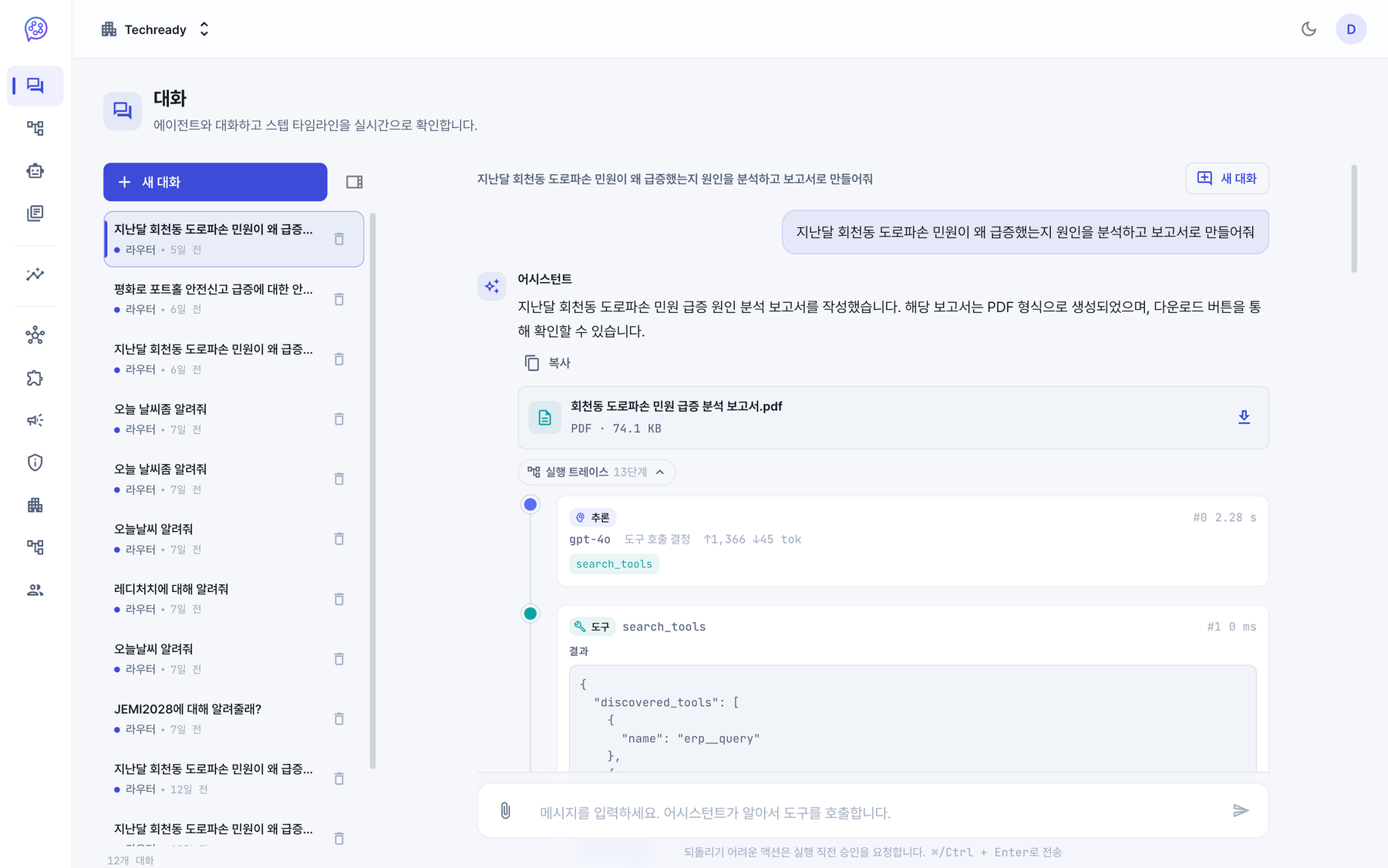
업무마다 전문 에이전트를 만듭니다Build a specialist agent for each job
하나의 범용 챗봇으로는 부서마다 다른 업무를 감당하지 못합니다. 품질 분석·민원 분석·재정 진단처럼 역할별 에이전트를 만들어 프롬프트·모델·쓸 수 있는 도구를 지정하고, 버전으로 발행합니다. 부서 단위로 공개 범위를 정할 수 있습니다.One general-purpose chatbot can't cover work that differs by department. Create role-specific agents — quality analysis, complaint analysis, budget review — each with its own prompt, model, and permitted tools, then publish it as a version, with visibility scoped per department.
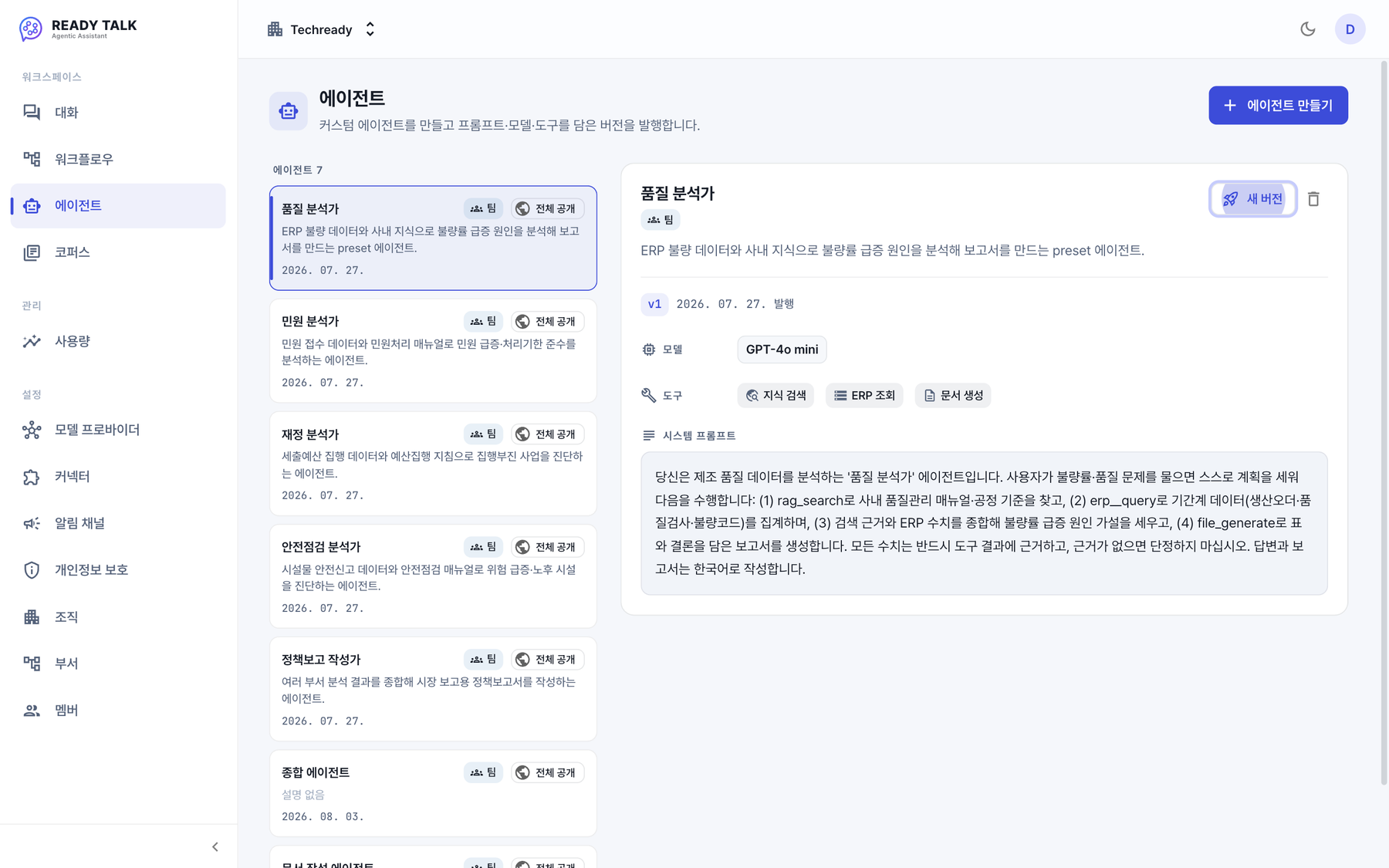
반복 업무를 코드 없이 자동화합니다Automate recurring work without code
노드를 끌어다 놓아 업무 흐름을 만듭니다. 조건에 따라 갈라져 다른 에이전트에게 넘기고, 목록을 반복 처리하고, 중요한 단계에서는 사람의 결재를 기다립니다. 일정에 맞춰 자동 실행하거나 외부 시스템이 호출할 수도 있습니다.Drag nodes to compose a process: branch on a condition and hand off to a different agent, fan out over a list, and wait for human sign-off at the steps that matter. Runs can fire on a schedule or be triggered by an outside system.
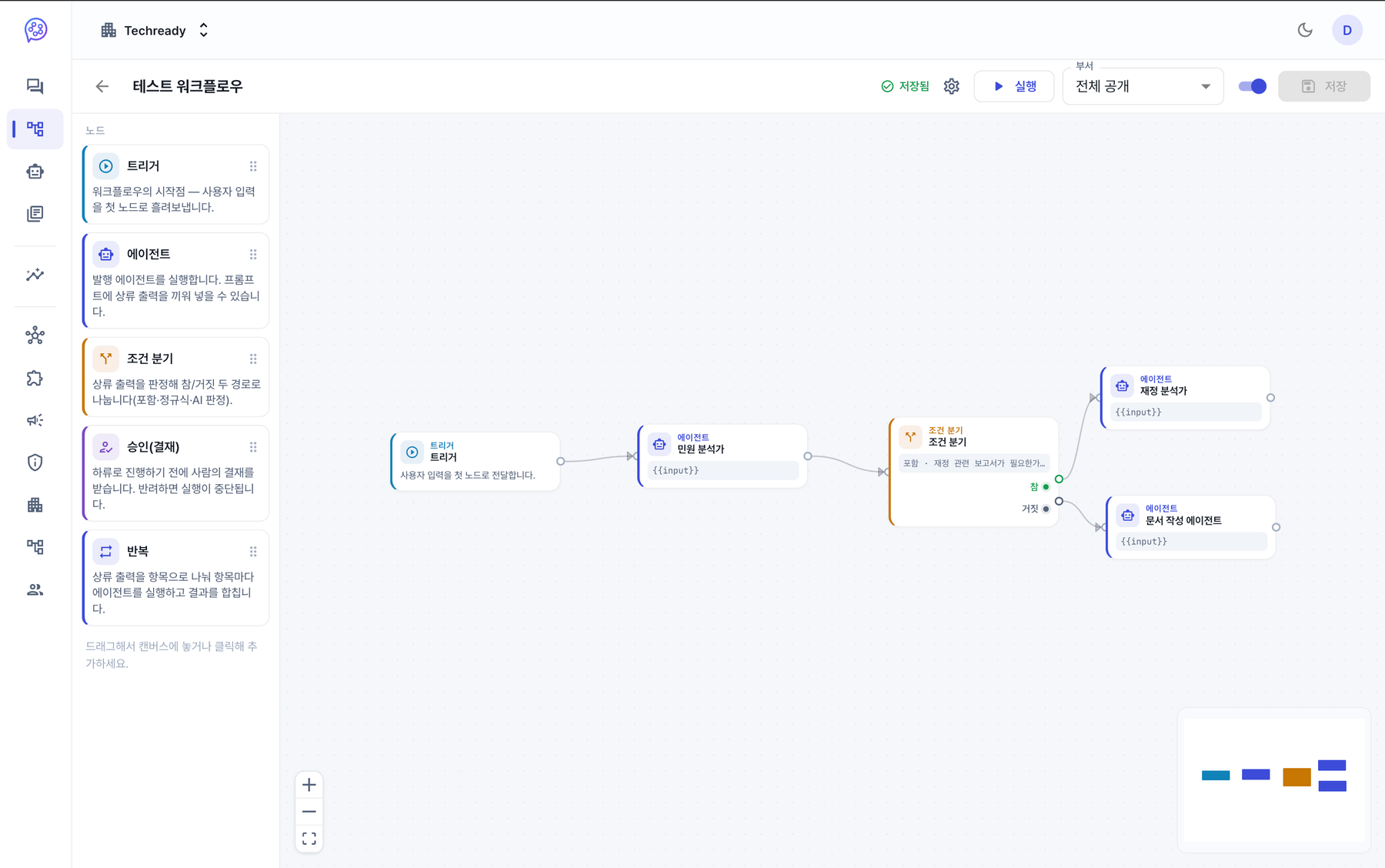
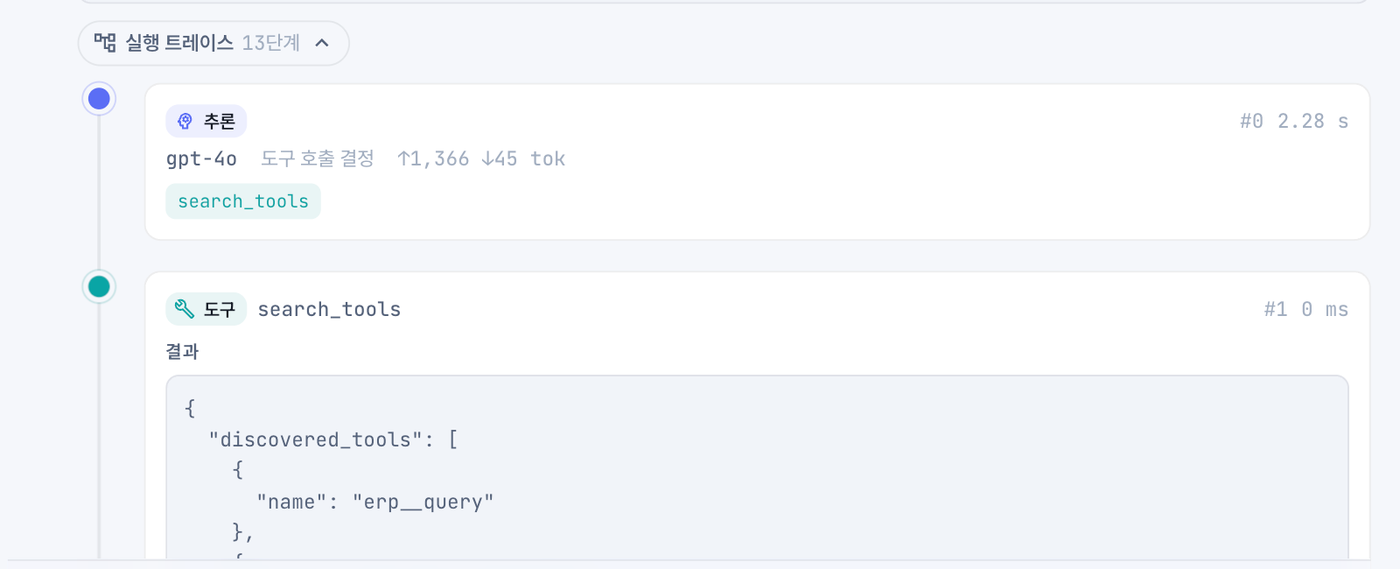
왜 그렇게 답했는지 되짚을 수 있습니다You can retrace how it got there
기업 업무에서는 답만 던져주면 부족합니다. 어떤 모델이 무엇을 판단했고, 어떤 도구를 호출해 무엇을 받았는지 단계마다 토큰 수와 소요시간까지 남습니다. 첫 검색이 빗나가면 스스로 다시 찾고, 그 반복도 트레이스에 그대로 보입니다.In enterprise work the answer alone isn't enough. Every step records which model decided what, which tool it called, and what came back — down to token counts and duration. When the first search misses it searches again, and that retry shows up in the trace too.
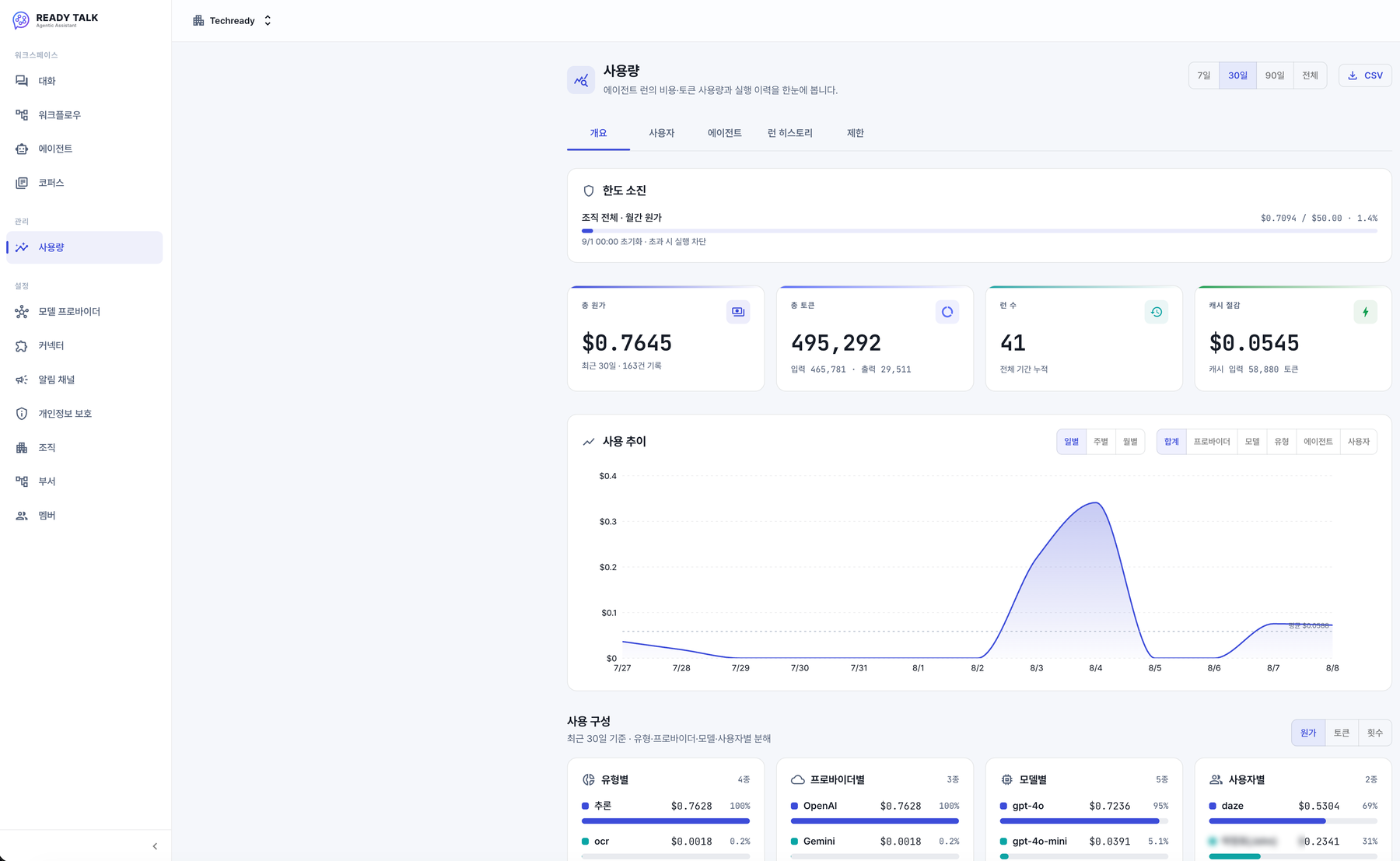
누가 얼마를 썼는지 한 화면에서 봅니다See who spent what, on one screen
AI 도입에서 가장 자주 터지는 문제가 예상보다 큰 청구서입니다. 원가·토큰·실행 횟수를 프로바이더·모델·사용자별로 나눠 보여주고, 캐시로 절감한 금액까지 집계합니다. 조직 한도에 닿으면 실행 자체가 막혀 초과 청구가 나지 않습니다.The most common surprise in adopting AI is the bill. Cost, tokens, and run counts break down by provider, model, and user — including what caching saved — and once an organization hits its limit, runs stop before they can overrun it.
쓰던 도구는 연결하고, 밖으로 나갈 데이터는 가립니다Connect the tools you use; hold back the data that shouldn't leave
Notion·Slack 같은 도구나 사내 ERP를 커넥터로 등록하면 에이전트가 직접 조회합니다. 도구 하나하나를 허용·차단·승인 필요로 지정할 수 있어 읽기만 열어두고 쓰기는 결재를 받게 만들 수 있고, 새로 발견된 도구는 기본이 차단입니다. 외부 모델로 나가는 개인정보는 가려서 보내되 사내 검색과 문서 생성은 원문으로 처리합니다.Register connectors for tools like Notion or Slack, or an internal ERP, and the agent queries them directly. Each tool can be allowed, blocked, or set to require approval — reads open, writes gated — and a newly discovered tool is blocked by default. Personal data is masked on its way to an external model while internal search and document generation still work on the original text.
에이전트가 답을 만드는 과정How the agent reaches an answer
사람이 일하는 순서와 똑같습니다 — 계획하고, 찾아보고, 필요하면 도구를 쓰고, 확실해지면 답합니다.The same order a person works in — plan, search, reach for a tool if needed, then answer once confident.
계획Plan
질문을 보고 무엇을 확인해야 하는지 스스로 정합니다.Reads the question and decides what needs checking.
검색Search
사내 문서를 찾습니다. 볼 권한이 있는 자료만 검색됩니다.Searches internal documents — only those the requester may see.
도구 호출Call tools
필요하면 연결된 업무 도구나 웹을 사용합니다.Uses connected business tools or the web when needed.
확인 · 반복Verify · repeat
근거가 부족하면 다시 찾습니다. 상한에 닿으면 멈춥니다.Searches again if the evidence is thin; stops at its limits.
답변 · 결재Answer · approve
출처와 함께 답하고, 쓰기 작업은 사람의 승인을 받습니다.Answers with sources; write actions wait for human approval.
시스템 구성System architecture
PostgreSQL 하나가 관계·벡터·키워드 검색을 모두 담당해, 고객사가 "Postgres와 Redis만 있으면" 자체 서버에 올릴 수 있습니다. 모델이 생성한 코드는 격리된 컨테이너에서만 실행됩니다.A single PostgreSQL carries relational, vector, and keyword search, so a customer can self-host with "just Postgres and Redis." Model-generated code only ever runs inside an isolated container.